
People, vehicles, animals
Detected and tracked inside the Nx server, with their boxes live and in the archive; you find them in the Nx “Objects” tab.
Plugin for Nx Witness
IA-N Analyse is ElectroniSafe's artificial intelligence video analytics plugin for Nx Witness. It is installed inside the Nx server, on Windows or Linux, and analyses the cameras already in place: detection of people, vehicles and animals, alarm rules (intrusion, zone entry and exit, line crossing, loitering, dwell time, crowd), optional French license plate reading and alarm transmission to a monitoring centre (SIA DC-09, Contact ID). No image leaves the site. It is listed in the official Nx Witness integrations catalogue, with a 30-day free trial.
Listed in the official Nx Witness integrations catalogue — view the listing
Updated on 22 October 2026
Video
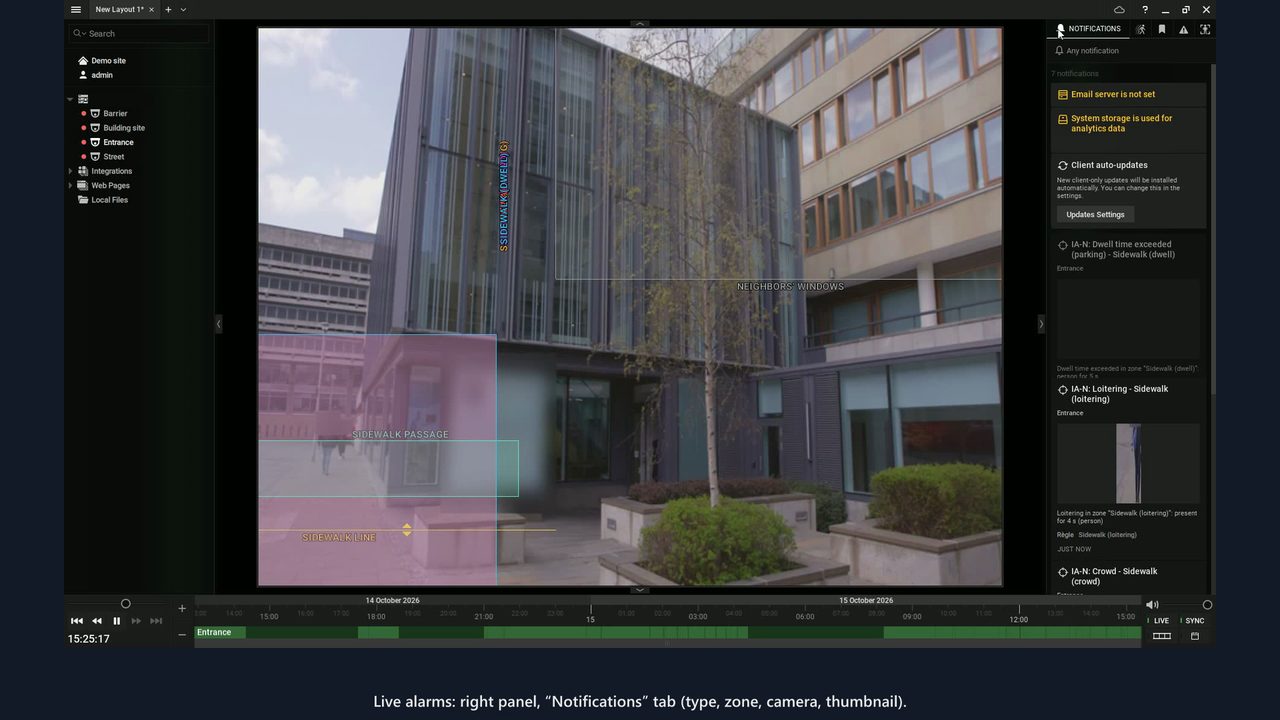
Live alarms and archive search, in a real Nx Witness client.
Video hosted by YouTube (Google): the player only loads after you click, from youtube-nocookie.com. Watch the video on YouTube.
What the plugin does
Everything is set and viewed in the Nx client: the alarms are Nx events like any other.
Detected and tracked inside the Nx server, with their boxes live and in the archive; you find them in the Nx “Objects” tab.
Intrusion, zone entry and exit, line crossing with direction and tailgating, loitering, dwell time, crowd. Each alarm is an Nx event “IA-N: …”.
Stationary objects are ignored by default: a parked car does not trigger an alarm, a person who arrives is reported once.
As an option, camera by camera, inside a drawn zone: vehicles at walking pace (access point, barrier, car park), not roads or motorways.
Alarms sent to the receiver of an alarm monitoring centre in SIA DC-09 (SIA-DCS) or Contact ID, with a schedule to the second. Included in every licence.
ElectroniSafe's portal prepares the site's GDPR file from the server configuration, without any personal data, and sends it to the licence holder.
Commissioning
The free measurement kit estimates the server's capacity in 5 minutes, without installing anything and without stopping Nx.
Windows: INSTALLER.bat. Linux (Ubuntu 22.04 or 24.04): installer_linux.sh. The kit is checked before installation, the previous version is kept and the Nx service restarts once.
In the Nx client: licence key or 30-day free trial, then IA-N ticked camera by camera.
Zones and lines drawn on the image, then Nx event rules: notification, bookmark, recording, e-mail…
Technical sheet
| Video software | Tested with Nx Witness, Nx Meta and Wisenet WAVE 6.1.2.42921, and DW Spectrum 6.1.2.43047 (Windows and Linux). For another version, ask us before installing. |
| Server | Windows Server 2022, or Ubuntu 22.04 or 24.04 (64-bit). Keep about 30% of the CPU for Nx itself. |
| Processing | On the CPU; on Windows, a graphics card can speed up the analysis, with automatic fallback to the CPU. |
| Nx licences | One Nx recording licence per analysed camera: Nx only passes frames to the plugin when the camera is recorded or viewed. |
| Network | No extra connection to the cameras. Outbound HTTPS to ElectroniSafe's servers for the licence and updates; a link to the centre's receiver if alarm monitoring is enabled. |
| Licence | One key per Nx server, entered once; yearly licence per camera (1 camera = 1 place), with per-camera options: Precision, Advanced rules, license plate reading. Alarm monitoring and GDPR file included. |
| Free trial | 30 days, from the Nx client or our trial page: 4 cameras, including 1 at Precision level, 4 with Advanced rules and 1 with license plate reading. For businesses only, one trial per company and per server. |
| Plugin languages | French, English, German, Spanish, Italian. |
| Updates | Signed by ElectroniSafe: security fixes installed automatically, new features on request, automatic return to the previous version if a version does not start. Each version receives security fixes for at least 5 years after its release. |
| Version | 1.4.0 |
Capacity depends on the server: the free measurement kit estimates it for the target server. Our measurements are published on the Trust page.
Privacy
The plugin analyses the frames in the Nx server's memory; it records none and sends none. It never tries to find out who a person is: no facial recognition, no biometric data. For the licence, only technical data (key, number of cameras, hashed technical fingerprints of the server, versions) goes to ElectroniSafe's portal, hosted in France. Excluded zones mask neighbours' windows and the public road: nothing is analysed there. Details: guide GDPR and video analytics in Nx Witness and Trust page.
Practical guides
Technical support: support@electronisafe.fr, French business days from 9:00 to 18:00 (Paris time), in English or French. PDF guides and videos: Documentation page.
Frequently asked questions
Another question? Our sales team will answer.
No. The plugin is installed inside the Nx Witness server and analyses the frames Nx already receives: no extra box, no camera to replace, no extra connection to the cameras.
Tested with Nx Witness, Nx Meta and Wisenet WAVE 6.1.2.42921, and DW Spectrum 6.1.2.43047 (Windows and Linux). For another version, write to us before installing: every new Nx version goes through our non-regression test bench before it is validated.
No. The plugin computes on the CPU; on Windows, a graphics card can speed up the analysis, with automatic fallback to the CPU. The free measurement kit estimates the server's capacity in 5 minutes.
One key per Nx server, entered once, and a yearly licence per camera: 1 camera = 1 place. Per-camera options: Precision, Advanced rules, license plate reading. Alarm monitoring and the GDPR file are included in every licence.
From the Nx client (Site Administration › Integrations › IA-N Analyse, “Start the 30-day free trial” frame) or from our trial page, with a business e-mail address. One trial per company and per server.
No. Frames are analysed in the Nx server's memory; the plugin records none and sends none. Only licence data (key, number of cameras, hashed technical fingerprints of the server, versions) goes to our portal, hosted in France.
Also worth reading
Nx Witness and Nx Meta are trademarks of Network Optix, Inc.; Wisenet WAVE, of Hanwha Vision; DW Spectrum, of Digital Watchdog.
Start the 30-day free trial, or tell us about your project: we help you size the server.